Home
Home  Navigation


*You can now dive into the thrilling world of Fortnite Mobile on your Mac! Start with our comprehensive guide on how to play Fortnite Mobile on Mac with BlueStacks Air.*
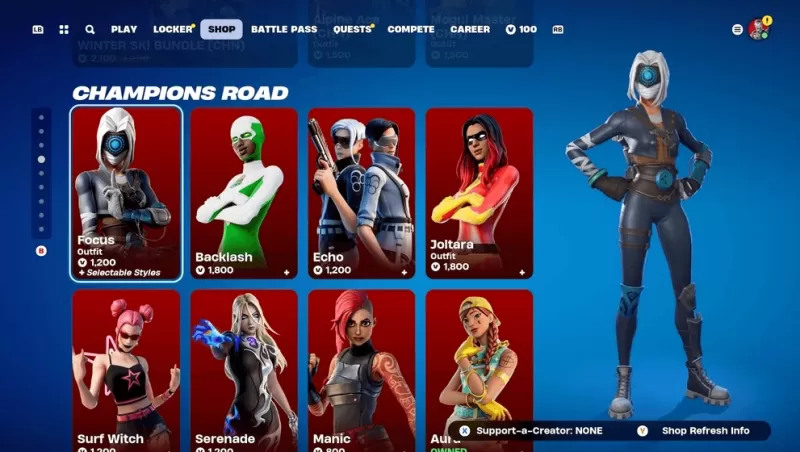
Fortnite Mobile, developed by Epic Games, is a wildly popular battle royale and sandbox survival game that captivates players with its dynamic gameplay and vibrant community. At the core of personalizing your Fortnite experience is the Fortnite Item Shop, an in-game marketplace where you can purchase a variety of cosmetic items to customize your character and enhance your gameplay. The shop refreshes daily, introducing a fresh array of skins, emotes, pickaxes, and more, ensuring there's always something new to discover. This guide will walk you through everything you need to know about the Item Shop, from accessing it to smart shopping strategies, helping you make the most of your V-Bucks.
How to Access the Item Shop
Getting into the Item Shop is a breeze:
- Launch Fortnite on your preferred device, whether it's a PC, console, or mobile.
- From the main menu, find and click on the Item Shop tab.
- Browse through the available items, which are neatly categorized by type and bundle offers.
- Select an item to see more details and explore your purchase options.
Remember, the Item Shop refreshes daily at 00:00 UTC, introducing new items and potentially retiring older ones.
Strategies for Smart Shopping
To maximize your Fortnite experience without breaking the bank, consider these smart shopping strategies:
- Check Daily Rotations – The shop changes every 24 hours, so regular checks ensure you don't miss out on new or returning items.
- Save for Rare & Special Skins – Limited-time event skins may not come back for months or years, so saving up for these can be worthwhile.
- Consider Battle Pass Over Single Purchases – The Battle Pass often offers better value for your V-Bucks, giving you more bang for your buck.
- Monitor Bundles – Some items are more cost-effective when purchased in bundles rather than individually.
- Use Websites for Predictions – If you're on the hunt for a specific item, shop prediction sites can be a valuable resource to help you plan your purchases.
The Fortnite Item Shop is your gateway to a personalized gaming experience, offering a daily changing selection of skins, emotes, and other cosmetic items. By understanding how the shop functions, how to earn and spend V-Bucks wisely, and employing smart shopping tactics, you can enhance your Fortnite journey while staying within your budget. For Mac users eager to join the action, be sure to follow our Download Guide to install Fortnite properly on your system. And don't forget, you can enjoy Fortnite Mobile on your PC or laptop with the seamless experience provided by BlueStacks!
 Latest Articles









 Latest Games